
As a beginner or even an intermediate consultant, we often get stuck when it comes to the basic flow of Procure to Pay (P2P). No matter how far you have progressed in your journey as a consultant, the basic P2P cycle can never be replaced.
In this blog, I will be covering some simple points along with the common flow of the P2P cycle. Let’s begin with the basic Procure to Pay flow, along with answers to some common questions.
Introduction
In any organization, purchasing goods or services from suppliers is a routine activity. The Procure to Pay (P2P) cycle in Oracle (or any other ERP application like Salesforce or SAP) ensures that this process is handled in a structured, controlled, and auditable way—from the moment a requirement for goods or materials is raised to the final payment made to the supplier.
This guide explains the P2P process in ERP applications and in real life in a simple, professional, and easy-to-understand manner for both freshers and developers.
What Is Procure to Pay (P2P)?
Procure to Pay (P2P) is the complete business process that includes:
- Requesting goods or services
- Purchasing them from a supplier
- Receiving the goods
- Recording the supplier invoice
- Making payment to the supplier
It mainly involves four core Oracle modules:
- Oracle Purchasing (PO) – Handles requisitions and purchase orders
- Oracle Inventory (INV) Manages the receipt and storage of goods
- Oracle Accounts Payable (AP) – Records supplier invoices and processes payments
- Oracle General Ledger (GL) – Records the accounting entries and financial impact of the transactions
High-Level P2P Process Flow
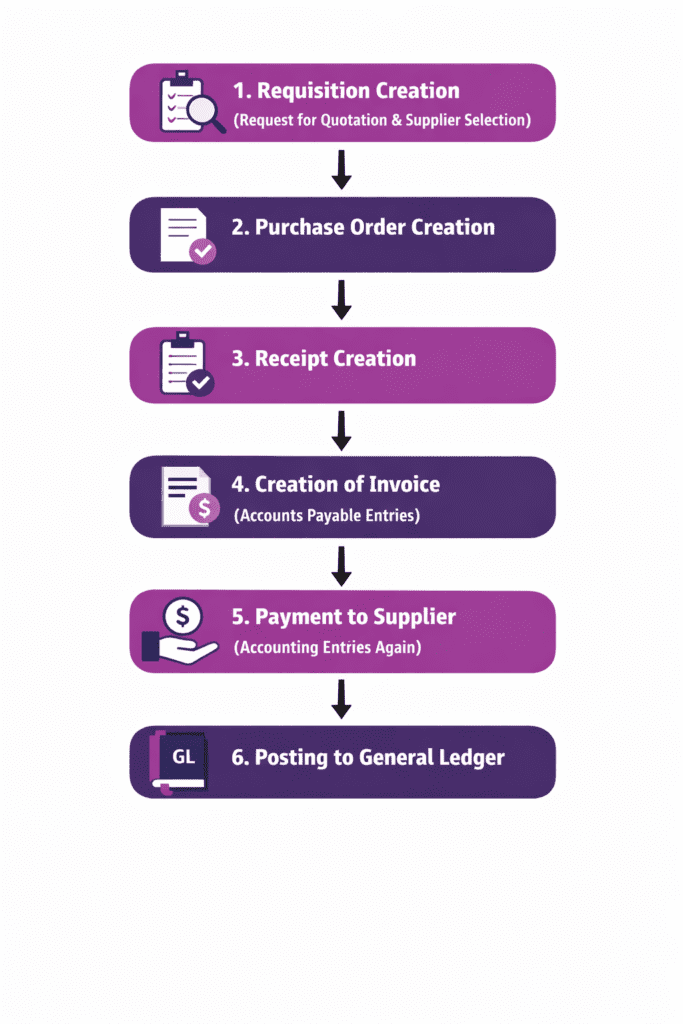
The P2P cycle follows this sequence:
→ 1. Requisition Creation
      (May include Request for Quotation and selecting the best supplier)

→ 2. Purchase Order Creation

→ 3. Receipt Creation

→ 4. Creation of Invoice
     (Includes accounting entries in Accounts Payable)

→ 5. Payment to Supplier
     (Accounting entries generated again)

→ 6. Posting to General Ledger
Key takeaway:
Why Accounting Is Done Twice?
From the above flow, you can see that accounting is created twice:
- At the time of invoice creation
- At the time of payment to the supplier
The reason accounting is done twice is because there are two separate financial events in the P2P cycle.
| Event | What Happens |
|---|---|
| Invoice Creation | Liability is recorded. No payment has been made yet; only the amount payable to the supplier is recognized. |
| Payment | Liability is cleared because the payment is made to the supplier. |
At the invoice stage, the company records that it owes money to the supplier.
At the payment stage, the company actually pays that amount, and the liability is removed from the books. This is why Oracle generates accounting entries at both stages.
Each step ensures proper control, approval, and financial accuracy.
Let’s cover each step briefly so we can clearly understand the basic flow and how Oracle handles these transactions internally.
Steps involved in complete P2P Cycle
Step 1: Requisition Creation
A Requisition is an internal request to purchase goods or services.
Understand it like this:
You own a mobile shop. Now, to sell mobile phones, you first need to purchase them from a supplier. So you (the buyer) prepare an internal requirement to buy those mobile phones.
Note: Preparer (Buyer) is important!
Purpose
- Inform the purchasing department about a requirement
- Get approvals before spending company money
Key Activities
- User creates a requisition
- Manager or approver reviews and approves it
- Approved requisition moves to purchasing
Types of Requisition
- Internal Requisition
- Purchase Requisition
Common Tables in EBS R12
PO_REQUISITION_HEADERS_ALLPO_REQUISITION_LINES_ALLPO_REQUISITION_DISTRIBUTION_ALLPO_LINE_LOCATIONS_ALL
Important columns in PO_REQUISITION_HEADERS_ALL Table-
1. SEGMENT1 – It is nothing but the Requisition Number.

2. PREPARER_ID – It is nothing but the Buyer ID, which you can also find in the column named PERSON_ID in the PER_ALL_PEOPLE_F table of the HRMS module.

3. CREATED_BY – It represents the User_ID (or Login User ID) who created the record.

4. TYPE_LOOKUP_CODE – It indicates the Requisition Type (Purchase or Internal).

5. ORG_ID - It represents the Operating Unit. You can also find the Organization ID in the HR_OPERATING_UNITS table along with all the details related to the organization.
Step 2: Purchase Order (PO) Creation
After requisition approval, the purchasing team creates a Purchase Order (PO) and sends it to the supplier.
Purpose
- Official document sent to the supplier
- Contains item, quantity, price, and delivery details
Types of Purchase Orders
- Standard PO – One-time purchase
- Blanket PO – Long-term agreement with multiple releases
- Contract PO – Legal agreement without quantity details
- Planned PO- Purchase order with planned deliveries and schedules over a period of time.
Common Tables in EBS R12
PO_HEADERS_ALLPO_LINES_ALLPO_DISTRIBUTIONS_ALLPO_LINES_LOCATIONS_ALL
Important columns in PO_HEADERS_ALL Table-
1. SEGMENT1 – It is nothing but the PO Number.

2. VENDOR_ID – It is nothing but the Supplier ID, which you can also view in detail in AP_SUPPLIERS tables by column name SUPPLIER_ID.

3. VENDOR_SITE_ID – It is SUPPLIER_SITE_ID column in AP_SUPPLIER_SITES_ALL table.

4. TYPE_LOOKUP_CODE – It indicates the PO Type (Standard/ Blanket / Planned/ Contract).

5. DOCUMENT_CREATION_METHOD - It represents the creation method of the PO (Auto create / Manual).
Important columns in PO_LINES_ALL Table-
1. ITEM_CODE – In PO_LINES_ALL table you will only see Item code, not the Item name. To see the name of Items, you must query the Inventory tables.
What information PO_LINES_LOCATIONS_ALL Table contains?
The table contains PO's Shipment details.
The table also has information related to Match Approval Level i.e. 2Way, 3Way, or 4Way.
Step 3: Receipt of Goods
When the supplier delivers the goods, a Receipt is created in Oracle.
Purpose
- Confirm that goods are received
- Record actual quantity delivered
- Enable invoice matching
Key Activities
- Receiving department creates receipt
- Quantity is verified
- System records the transaction
Common Tables in EBS R12
RCV_SHIPMENT_HEADERSRCV_SHIPMENT_LINESRCV_TRANSACTIONS
Key takeaway-
When you query the RCV_SHIPMENT_HEADERS table, you may see multiple receipts for the same Receipt Number. This happens because the same receipt number can be assigned to multiple ORG_ID (Organizations).
You can find your specific receipt by checking your Organization ID in the SHIP_TO_ORG_ID column.
Note: You can either create a New Receipt or you can also add in an Old Receipt.
Step 4: Supplier Invoice Creation
After delivering goods, the supplier sends an invoice.
This invoice is entered into Oracle Accounts Payable.
While creating the invoice, Oracle EBS R12 provides two options:
- We can create it individually.
- We can create it in a batch.
Once the invoice is created, validation is done before creating accounting.
After validation, accounting is created. Accounting is of three types:
- Draft Mode: Data related to accounting only goes to Subledger Accounting (SLA).
- Final Mode – Data related to accounting goes to Subledger Accounting as well as the General Ledger (GL) Interface.
- Final Post Mode: In this mode, the data reaches the SLA interface, the GL interface, and the programs related to Journal Ledger run in parallel, which push the data into the base tables of the General Ledger.
Purpose
- Record the supplier’s bill
- Validate it against the purchase order and receipt
Matching Types
a) 2-Way Matching
- Purchase Order vs Invoice
b) 3-Way Matching
- Purchase Order vs Receipt vs Invoice
This ensures:
- Correct quantity
- Correct price
- No overbilling
Common Tables
AP_INVOICES_ALLAP_INVOICE_LINES_ALLAP_INVOICE_DISTRIBUTIONS_ALL
Step 5: Payment to Supplier
Once the invoice is validated and approved:
- Payment is scheduled
- Payment process is run
- Supplier receives payment
Key Activities
- Payment batch creation
- Check or electronic payment
- Payment confirmation
Common Tables
AP_PAYMENT_SCHEDULES_ALLAP_CHECKS_ALLAP_INVOICE_PAYMENTS_ALL
Why the P2P Process Is Important?
The P2P cycle helps organizations:
- Control spending
- Prevent duplicate payments
- Ensure accurate financial records
- Maintain audit trails
- Improve supplier relationships
Common Interview Questions
1. What is the P2P cycle?
Answer: It is the process from requisition to supplier payment.
2. What is 3-way matching?
Answer: It is Matching between Invoice, Purchase Order, and Receipt.
3. Which table stores AP invoices?
Answer: AP_INVOICES_ALL
4. What comes after a requisition?
Answer: Purchase Order creation.
Conclusion
The Procure to Pay process is a core financial workflow in Oracle EBS.
Understanding each step—from requisition to payment—helps both functional users and technical developers work more efficiently and troubleshoot issues faster.
Disclaimer: This content is shared for educational purposes based on practical experience with Oracle EBS R12. System behavior may vary depending on configurations and customizations, so please verify details in your own environment before implementation. This blog is not affiliated with Oracle.
Also Read